ADDY RUTH
Staff / Principal Level Product Designer
Automation  •  AI  •  Industrial UX  •  Decision Intelligence
TARGET / HUMAN-GENERATED SIGNALS

When the Machine Can’t See the Problem

A worker could know something was wrong long before the automation system did.

Problem Solvers supported a large, repeated workstation area where many issues originated with people, product or process rather than machine telemetry. Finding someone who needed help could mean physically searching the floor.

I helped connect a simple physical signaling system to digital visibility so human-observed problems could become shared operational state.

Explore in Smart Warehouse →IMPLEMENTED WORK · RECONSTRUCTIONS
RECONSTRUCTION

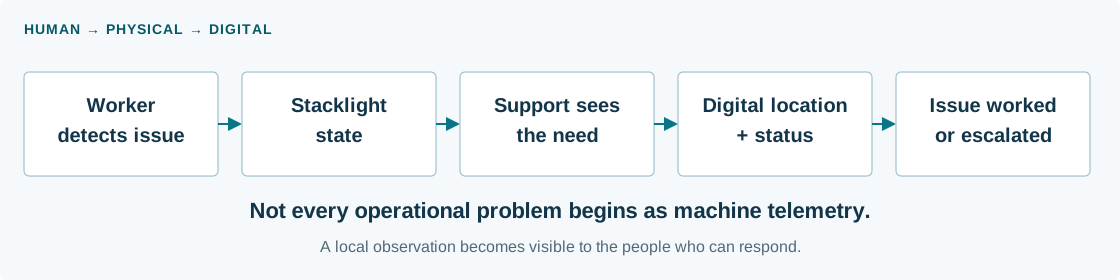
Human observation became operational telemetry.

Worker detects an issue, changes a stacklight state, support sees the need, digital location and status become visible, the issue is worked or escalated
Generalized workflow reconstruction. The physical cue and digital state describe the same human-observed condition.
1
The Tension

The problem existed before the system knew about it.

Repeated workstations surrounded conveyor lanes, with working space on both sides. Problem Solvers were responsible for helping across the area.

RECONSTRUCTION

Before: search the repeated work area.
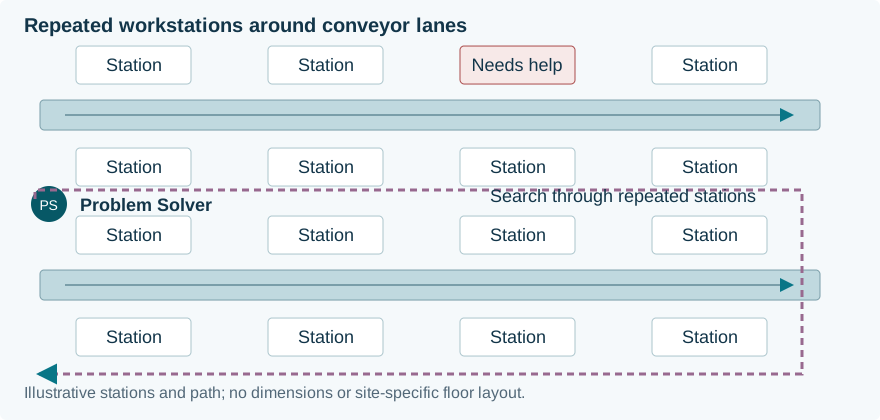
Generalized conveyor lanes with workstations on both sides; a Problem Solver walks a search path to find a station needing help
Finding the issue could mean walking the floor until the person needing help became visible.
RECONSTRUCTION

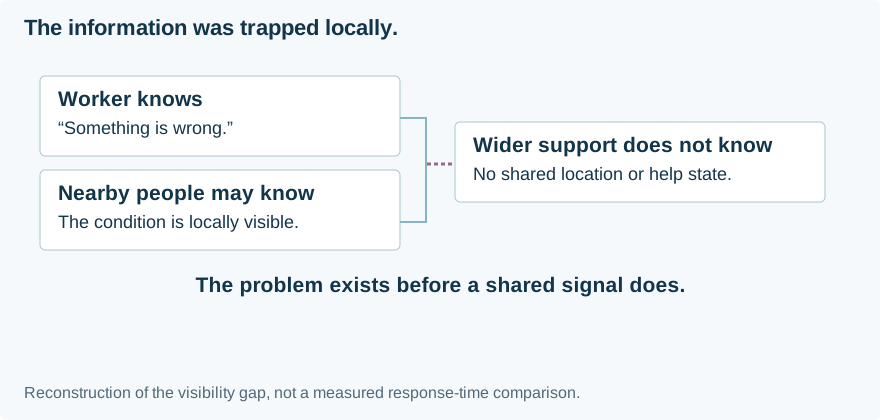
The information stayed local.

Worker knows about a problem; nearby people may know; wider support lacks a shared location or help state
The worker—and perhaps nearby people—knew. The wider support system did not.

The signal existed only in the person experiencing the problem.

Make a human-observed condition visible across the area without requiring a complex digital task.

2Research + System

The physical environment was part of the interface.

Teams were already improvising.

Existing physical signals made needs visible. The opportunity was to preserve that immediacy while connecting it to shared operational visibility.

Visibility depended on the working position.

A worker needed an easy-to-activate signal, visible from a distance and understandable without opening an application.

Beyond line of sight.

Digital location and state could show where help was needed, whether someone had responded and when Maintenance was required.

The best interface for raising the issue was not necessarily a screen.

The screen became useful afterward: for location, coordination and state.

RECONSTRUCTION

Research → physical environment

  1. 01Repeated workstation areaSimilar stations make an issue difficult to locate.
  2. 02People / product / processThe condition may not originate in equipment.
  3. 03Support covers a large areaOne Problem Solver must find the next need.
  4. 04Limited line of sightA local observation is not shared awareness.
Field-workflow synthesis reconstructed from workstation and layout evidence. This is a generalized spatial problem—not the installed sightline study or a measured floor plan.
RECONSTRUCTION

One station signals. The area gains a location.

Manual search across repeated workstations

The support team has to find the problem.

The issue exists at one station. Without an explicit shared signal, a Problem Solver relies on local contact and walking the area.

Illustrative workstation count, positions and search path. No dimensions or site-specific floor layout are reproduced.

RECONSTRUCTION

How the problem changed

  1. 01Worker sees the issuePeople notice product and process problems.
  2. 02Automation has no signalMachine telemetry cannot represent this observation.
  3. 03Support searches the floorKnowledge stays local without a shared request.
  4. 04Physical flag creates the signalRaise the need where the work happens.
  5. 05Digital visibility extends reachLocation and response state can travel beyond sight.
Reconstruction grounded in the implemented SICK workflow. The design preserved the worker’s immediate physical request rather than adding a reporting task.
3
The Pattern

Three colors created a shared operational language.

The colors did not simply represent severity. They communicated need, ownership, progress and escalation.

RECONSTRUCTION

Early design / signal-state model

  • Red · request
    Needs Problem Solver attention. A worker has made the need visible.
  • Yellow · ownership
    The Problem Solver is actively working the issue.
  • Blue · escalation
    Needs Maintenance attention. The required responder changes.
Reconstructed state model of the implemented workflow. These colors encode need, ownership and progress—not generic severity. Text labels carry the meaning alongside color.
RECONSTRUCTION
Physical stacklight

Color + explicit state

Digital location + status

Needs Problem Solver attention

A worker has identified a condition requiring help.

Location
Workstation / conveyor location
Support owner
Problem Solver
Next action
Locate the station and acknowledge the request.

Waiting for support.

The state told people not only that something was wrong, but who needed to act next.

RECONSTRUCTION

Detailed response workflow

  1. 01 · Entry point

    Worker detects the issue

    Schematic view / evidence

    A condition is visible to the person, but not reliably visible to automation.

    User action
    Activate the request at the workstation.
    System / shared response
    Red makes the need for Problem Solver attention visible.
    Next → state 2
  2. 02 · Workflow state

    Problem Solver locates the request

    Schematic view / evidence

    Red physical signal and shared location identify where help is needed.

    User action
    Go to the station and pick up the work.
    System / shared response
    Yellow communicates that the Problem Solver is actively working the issue.
    Next → state 3
  3. 03 · Workflow state

    Problem Solver investigates

    Schematic view / evidence

    The issue, local context and current ownership remain together.

    User action
    Resolve locally, or determine that Maintenance is needed.
    System / shared response
    The response can stay local or cross an explicit support boundary.
    Next → decision below
DecisionCan the Problem Solver resolve it?
Yes → local resolutionProblem Solver resolves the issue

Return from the active request to resolved / normal operation.

No → Blue / MaintenanceMaintenance attention is needed

Blue communicates the support need; Maintenance responds and resolves the condition.

Resulting state / return to evidenceResolved after either response path

The request no longer needs support. Need, ownership and escalation remain distinguishable throughout the response.

Detailed reconstruction of the implemented need → ownership → escalation → resolution interaction. Schematic workflow states, not recovered workstation controls or production dashboard screens.
4
Design Decisions

Connect the floor signal to shared operational visibility.

The implemented physical/digital relationship informs this Smart Warehouse concept. The dark view shows the future interpretation; it is not an internal production UI.

SMART WAREHOUSE / HUMAN-GENERATED SIGNALSCONCEPT INTERACTION
Illustrative location

Section / Conveyor / Workstation

Physical stacklight→Located digital state

Locate the request. See who needs to respond.

RED / WAITING FOR HELP

Needs Problem Solver attention

Responsible support
Problem Solver
Next action
Locate the station and acknowledge the request.
Simulated state · no live workstation telemetry or responder data
01

Keep signaling immediate

A worker should not need to stop work and navigate a complex application just to ask for help.

02

Encode ownership in the state

Distinguish waiting for a Problem Solver, active work and a need for Maintenance.

03

Extend visibility beyond line of sight

Show the request’s location and current state to support teams beyond direct sight.

04

Preserve escalation

Make Problem Solver → Maintenance a visible state transition, rather than an informal side conversation.

Human observation became operational telemetry.

Explore the connected prototype →
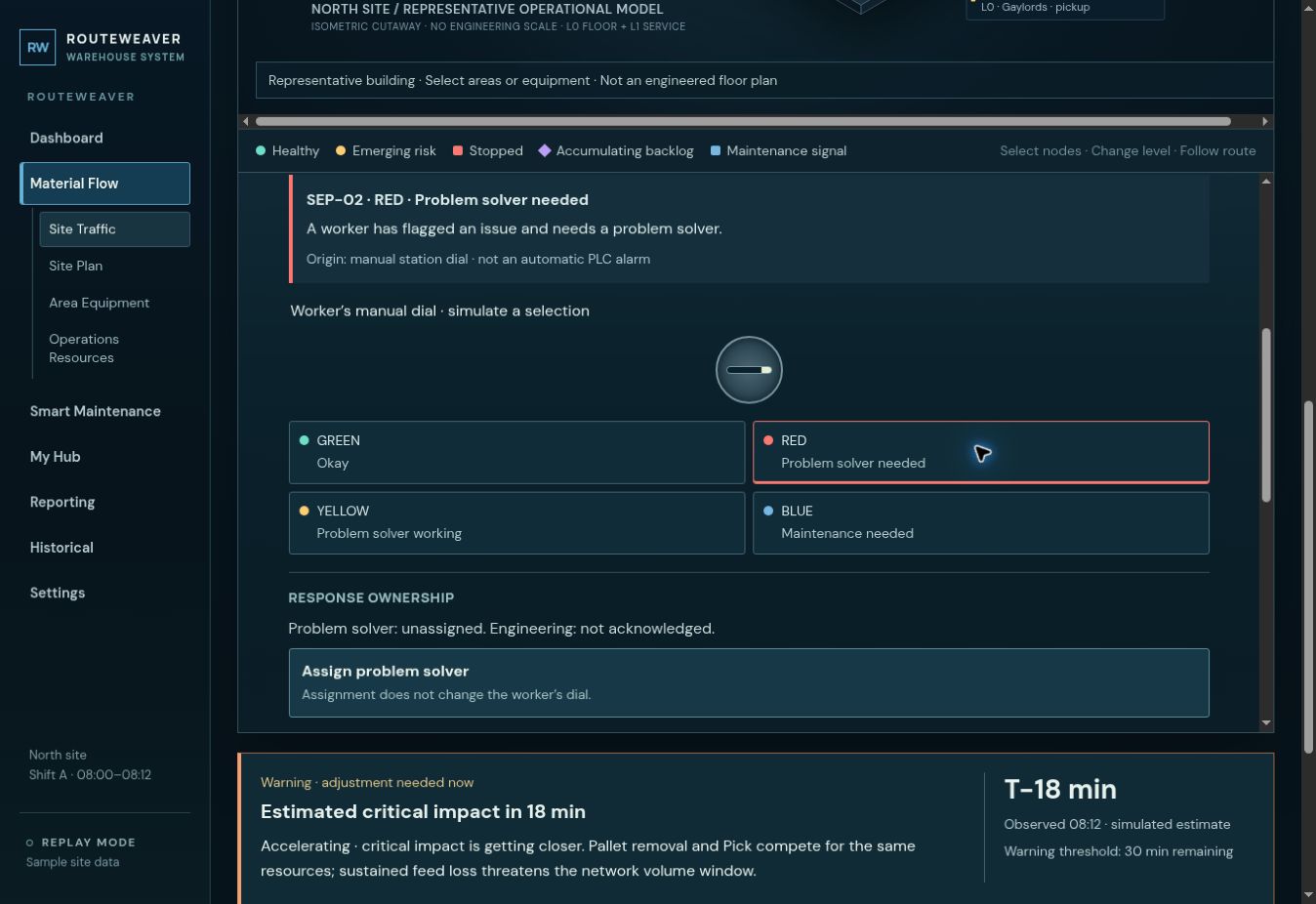
CURRENT PROTOTYPE · RECONSTRUCTION · SIMULATED DATA

A worker request becomes visible to support

Routeweaver shows SEP-02 flagged red, a manual worker dial and a separate Problem Solver assignment action.
Current coded prototype: the worker’s red flag and responder ownership remain separate states. Scenario: Material Flow → Signals / stations → SEP-02 → Red. View full-size screenshot ↗ Explore the prototype ↗ View full-size screenshot →
RECONSTRUCTION

Evidence → Decision → Tradeoff

  1. 01Human observationThe worker already knows the issue exists.
  2. 02Low-friction physical signalMake the need visible without a digital reporting task.
  3. 03Ownership + progressSeparate waiting from active response.
  4. 04Beyond line of sightConnect the request to shared digital visibility.
  5. 05Preserve escalationMaintenance need remains a distinct state.
Evidence informed the channel and state model. The tradeoff is dependence on human activation, placement and response capacity; digital visibility cannot replace those conditions.
5
Impact in Reality

What shipped, what we observed, and what remained directional.

Implemented across three sites, with broader expansion planned. Future applications remain concepts; no quantified response-time improvement is claimed.

IMPLEMENTED

3 sitesThree-color SICK workflow

  • Red / Yellow / Blue states at workstation/conveyor locations.
  • Dashboard visibility tied to location and state.
  • Response-state history.
OBSERVED

Explicit shared states

  • Used across three sites.
  • Made need, ownership and progress explicit.
  • Replaced reliance on manual search with a shared, locatable signal.
FUTURE DIRECTION

Other human-observed exceptions

  • Inbound assistance.
  • Manual work blockage.
  • Cage-cart / resource problems.
  • Limited equipment availability.
  • Other floor-level conditions automation cannot detect.
Supporting response history

The system could record the responder’s zID, duration in Red, duration in Yellow and, if Blue, time until Maintenance resolution. History supported the workflow; visibility was the central problem.

Field descriptions only. No internal IDs, records or responder information are reproduced.

A local observation became shared, locatable work.

IMPLEMENTED · GROUNDED SUMMARY

Pilot / rollout evidence

  1. 01Implemented at 3 sitesPhysical signal and digital response workflow.
  2. 02Validated in live operationsNeed, ownership and progress tested in field use.
  3. 03Broader expansion plannedPlanned scope remains distinct from completed rollout.
Grounded summary of the known rollout scope. Original validation captures or quotes are not reproduced, and no response-time percentage is claimed.

Reflection & Takeaways

Reality check

What worked. What remained hard.

What worked

  • Simple physical state.
  • Explicit support ownership.
  • Signal visible in the environment.
  • Digital visibility beyond direct sight.
  • Escalation from Problem Solver to Maintenance.

What remained hard

  • Someone still has to notice and activate the signal.
  • Not every problem fits three states cleanly.
  • Installation and layout matter.
  • Digital state depends on the response process behind it.
  • Escalation does not resolve underlying equipment or vendor complexity.

Visibility does not replace response capacity. It makes that capacity easier to coordinate.

Transferable pattern

From human observation to system-visible work.

  1. Identify problems people see before software can
  2. Minimize the effort required to signal them
  3. Encode ownership and progress
  4. Connect the signal to location and context
  5. Preserve escalation across roles
  6. Record response history where it supports learning

Useful anywhere frontline workers detect exceptions before software does.